Automated data processing: Streamlining your data workflows for faster insights

.png)

Table of Contents


TL; DR
- Manual data workflows create delays, errors, and constant firefighting across modern data teams
- Automated data processing removes repetitive ETL, checks, and handoffs across the entire pipeline
- Automation improves data quality by applying consistent logic and catching issues early
- Faster pipelines mean dashboards and reports update without manual intervention
- Automated systems scale with data volume without increasing team size or complexity
- Unified platforms simplify ingestion, transformation, governance, and activation in one place
You don’t lose time because data is hard. You lose time because your data workflows are manual in places they shouldn’t be.
Someone uploads a CSV. Someone reruns a job. Someone double-checks numbers “just in case.”
Multiply that by dozens of pipelines, hundreds of tables, and thousands of decisions — and suddenly your “modern data stack” feels anything but modern.
This is exactly why automated data processing (ADP) exists.
By automatically collecting, cleaning, transforming, and routing data, ADP slashes errors and accelerates insights.
That’s why it’s no surprise that by 2026, 30% of enterprises will automate more than half of their network and operational activities, up sharply from under 10% just a couple of years ago.
ADP matters now because data volumes and complexity have grown fast while business keeps moving faster. You can’t afford weeks of manual ETL or tracking down simple data mistakes. If you are still doing a lot of steps by hand, you’re slowing your team down and leaving opportunities on the table.
In this post, we’ll explain what automated data processing is, how it works, why it matters, and the benefits you can expect as data keeps growing.
What is automated data processing, and why does it matter now?
Automated data processing (ADP) means using software to run your entire data pipeline with very little manual work. It handles data ingestion, cleaning, transformation, and loading into analytics tools automatically. Instead of copying files, running scripts, or checking numbers by hand, predefined rules and automation take care of the work.
As much as 68% of organizational data never gets analyzed, meaning the business never realizes the full benefit of that data unless automation is in place to process it.
Automated data processing helps you:
- Remove repetitive manual tasks from data workflows
- Reduce errors caused by handoffs and manual checks
- Deliver analytics and reports faster
- Keep data consistent across teams and tools
- Spend more time on insights instead of maintenance
Note:
5X is built around this idea. The platform automates the full data lifecycle, including ingestion, transformation, validation, governance, storage, and activation, all within one governed platform. This allows teams to focus on using data rather than managing infrastructure.
What are the different types of data processing automation?
Data processing has many stages, and each can (and should) be automated. Broadly, you can think of four layers of ADP automation:
1. Automated data collection (Ingestion)
Automatically pulling data from all your sources. This might mean connectors to databases, APIs, SaaS apps, event streams or files. Automation here means data from CRM, finance, IoT sensors, etc. flows into your platform on schedule or on triggers, with no one copying CSVs by hand
For instance, 5X’s ingestion modules keep a common point of operation from a single trusted dataset. Ingestion automation eliminates silos by syncing data centrally in real time (e.g. whenever a new sale or lead is recorded).
5X has transformed the way we work. The automated data collection & reporting saves us 300 hours+ / month in manual work. And the insights help us identify & double down on activities that boost store revenue.
~ Kevin Santiago, President, Cupbop
Cupbop Customer Story
2. Automated cleaning and structuring (Transformation)
Once data is collected, it usually needs cleanup and organization. Transformation automation takes raw inputs, fixes formatting issues, standardizes values, merges related tables, and prepares the data so it is ready for use. This replaces manual scripts and makes sure every dataset that moves forward is consistent and reliable.
Automating transformation is basic to modern pipelines because it ensures data is usable as soon as it is ingested.
3. Automated quality checks (Validation and monitoring)
Getting data into a system and shaping it is not enough if you cannot trust it. Automated quality checks watch the data for problems like missing values, unexpected structures, or spikes in data patterns.
When issues are detected, these tools can alert teams or handle the corrections automatically. Quality automation builds trust in the data because it catches problems early, helping ensure analysis and reports are accurate.
With 5X, for instance, quality automation is built-in: pipelines include continuous checks (no missing rows, formats as expected) and enforce a single source of truth via a semantic layer.
Also read: Benefits of Intelligent Process Automation (IPA) for Business Success
4. Automated delivery (Activation and use)
Once data is collected, cleaned, and checked, it needs to go where people and systems can use it. Activation automation makes sure clean data gets pushed into dashboards, analytics tools, or business applications without someone having to run export jobs.
This is how insights reach the teams that need them in their daily workflows. Automation here turns processed data into real-time reporting and supports operational use cases like updating customer apps or feeding business systems with fresh data.
How does automated data processing work?
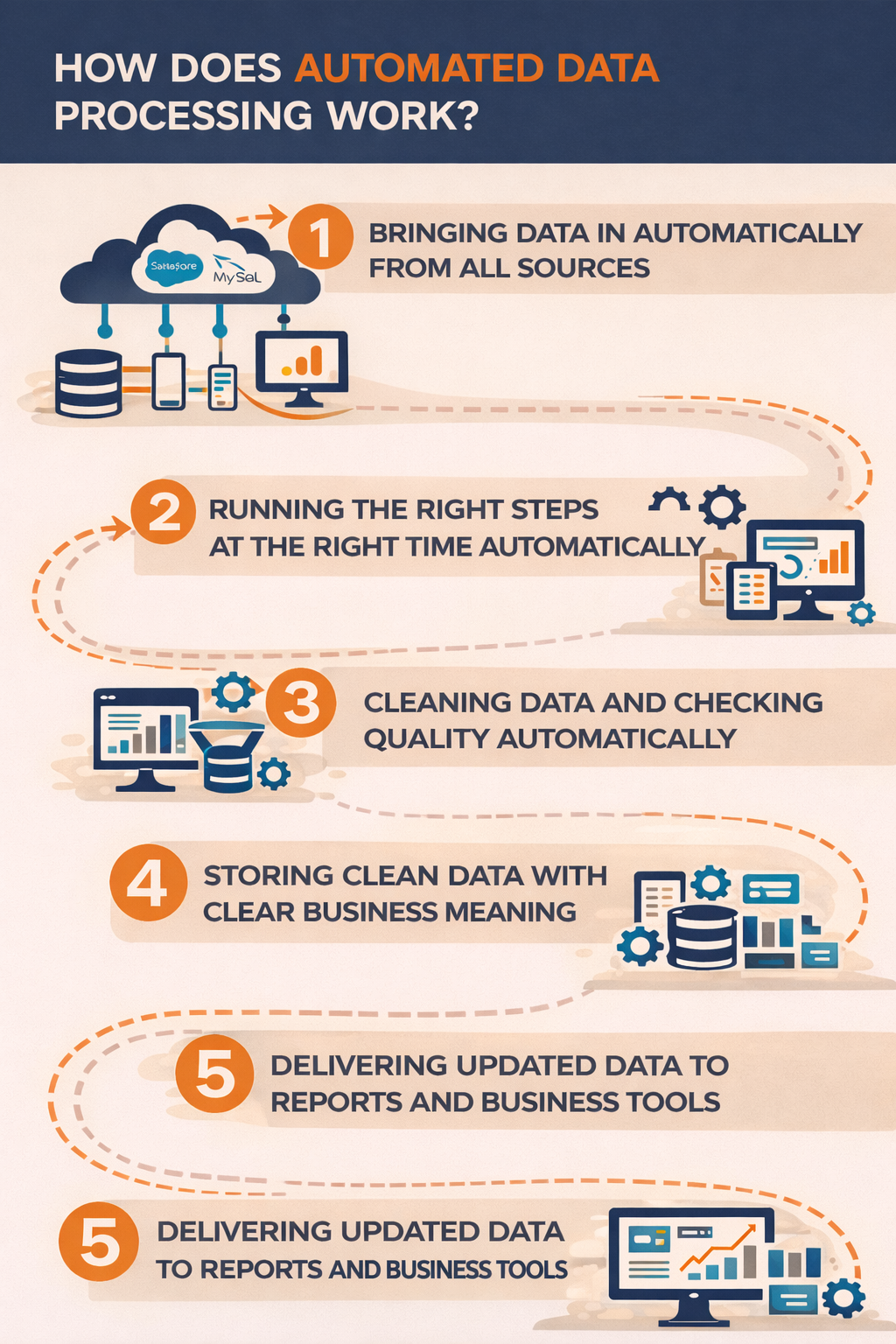
Think of ADP as a relay race where every stage hands off data to the next without dropping the baton. In practice, here’s how an end-to-end ADP workflow typically runs
1. Bringing data in automatically from all sources
Automated data processing is a series of connected steps that take raw data from its sources and prepare it for decision-making with almost no manual effort. The goal is to make data move reliably from where it starts to where it gets used, without people having to run scripts, move files, or fix every error by hand.
Modern tools make this possible by linking common pipeline stages in one system. For example, with 5X, you might click to add Salesforce, MySQL, and Google Analytics as connectors. Then, new data flows into your warehouse instantly.
“We no longer chase data—we use it. 5X gave us a foundation that works across every department, and even helped us launch our first ML models.”
Glen Butner, Business Intelligence Analyst, Vertex Education
Vertex Customer Story
2. Running the right steps at the right time automatically
Once data arrives, orchestration takes over. Orchestration controls when each step runs and in what order. It makes sure that cleaning and processing jobs only start after new data is available.
This removes the need for someone to manually trigger jobs or check whether a previous step finished. The pipeline runs on its own and follows the rules defined upfront.
3. Cleaning data and checking quality automatically
After ingestion and orchestration, the data is cleaned and prepared for use. Automated transformation jobs organize the data by fixing formats, combining tables, and calculating key values.
At the same time, automated quality checks look for problems like missing data, unexpected values, or changes in structure. These checks help catch issues early so errors do not spread into reports or dashboards.
4. Storing clean data with clear business meaning
Once the data is cleaned and validated, it is stored in a data warehouse where teams can use it for analysis. Many modern systems also apply a semantic layer at this stage. This layer defines business terms clearly so metrics like revenue or active users mean the same thing everywhere. This keeps reports consistent across teams and tools.
5X builds this layer automatically by using your transformation logic and models, which means metrics and key performance indicators stay consistent across teams without manual maintenance.
5. Delivering updated data to reports and business tools
The final step is activation. Automated delivery keeps dashboards updated and sends processed data into business tools like CRM or marketing systems. This means insights are not stuck in storage but are used directly in daily workflows. Reports refresh on their own and operational teams always see the latest data.
Key benefits of automated data processing
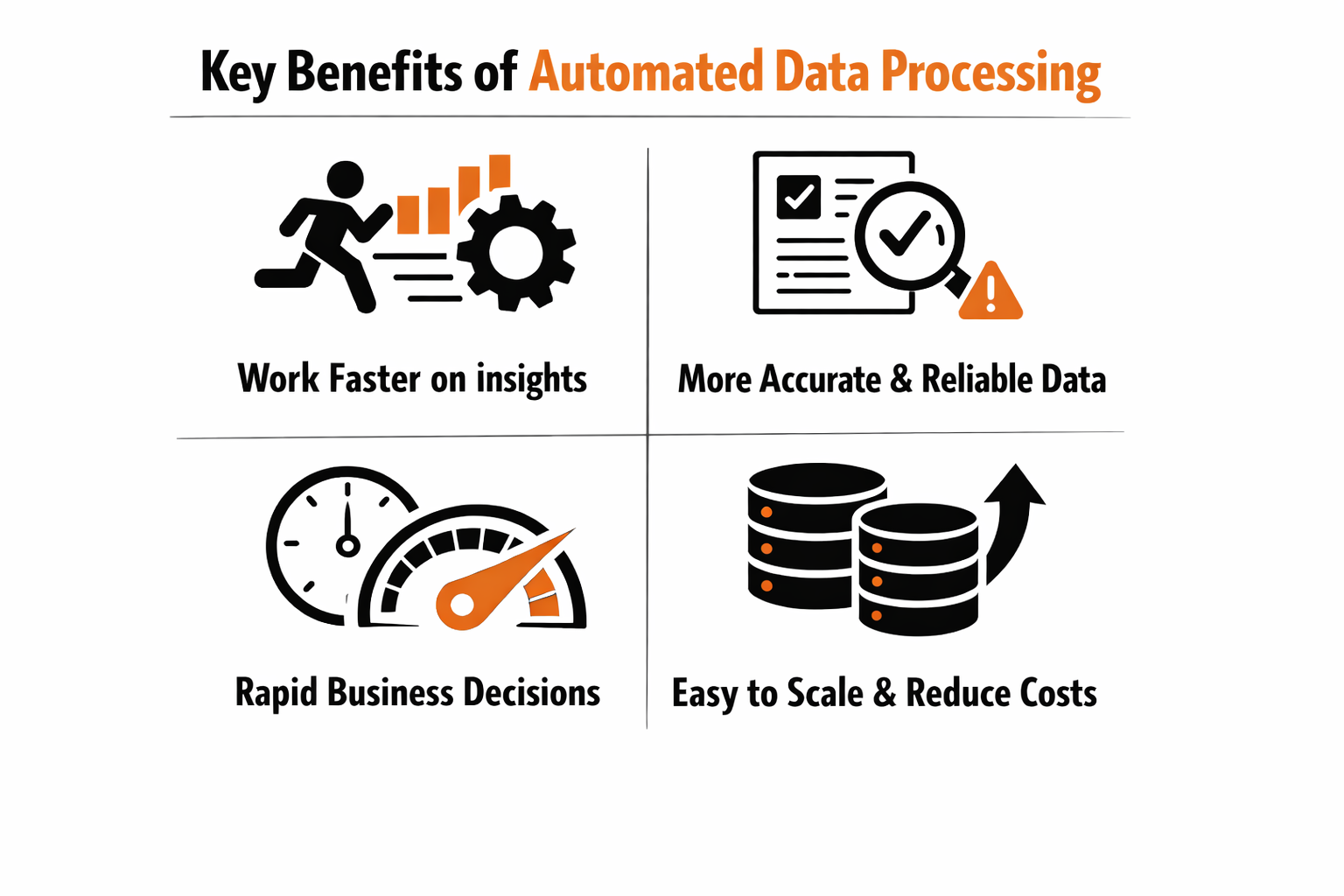
Transitioning to ADP pays off quickly across the board. Here are the top business outcomes teams report:
1. Teams work faster and focus on better work
Automated data processing removes repetitive manual tasks like copying files, rerunning jobs, or fixing small errors. Once pipelines are automated, teams stop spending time on routine work and start focusing on analysis and improvement.
Automation allows employees to spend more time on higher-value activities and less time on repetitive tasks, which directly improves productivity across data and analytics teams.
2. Data becomes more accurate and easier to trust
Manual data handling increases the chance of mistakes. Typos, missing fields, and inconsistent rules can all affect reports and decisions. Automation applies the same logic every time, which improves consistency and reliability.
Poor data quality costs organizations million dollars per year on average. Automated systems reduce these losses by catching issues early and enforcing consistent rules across the pipeline. When data quality improves, leaders trust dashboards and reports instead of second-guessing them.
Also read: How to build and improve data trust: Eight working strategies
3. Insights reach the business much faster
With automated data processing, data is ready for analysis shortly after it arrives. Dashboards refresh automatically and reports reflect current information without waiting for manual updates.
Companies using advanced automation and analytics are more likely to meet or exceed business targets because they can act on insights faster. Speed matters. Sales teams respond sooner, finance closes faster, and marketing sees results while campaigns are still running.
4. Data pipelines scale as the business grows
Manual processes struggle as data volumes increase. More data usually means more work and more people. Automated pipelines do not work that way.
Automation is essential for handling growing data volumes and complexity. Once pipelines are automated, adding new data sources or handling more records does not require rebuilding everything. The same system continues to run, even as the business scales.
5. Automation reduces costs and improves ROI
Automated data processing reduces spending on manual labor and error cleanup. It also improves decision quality, which has a direct impact on revenue and growth.
Deloitte reports that organizations adopting automation save millions of dollars annually through efficiency gains and reduced operational costs. Automation investments often deliver fast returns because savings appear quickly while long-term value continues to grow.
5X’s data platform provided the capabilities we needed out-of-the-box. No resources or time wasted in building a data platform.
~ George Ferreira, CTO, Upright
Upright Customer Story
How AI and machine learning are transforming automated data processing
If ADP is about removing manual toil, AI/ML in data processing is about adding intelligence. The next wave of automation uses machine learning and AI agents to enhance how pipelines work:
1. Detecting data issues automatically with AI
Traditional data checks rely on fixed rules. AI-based systems go further by learning what normal data looks like and spotting unusual behavior on their own. For example, machine learning models can detect sudden drops in revenue data, unexpected spikes in traffic, or missing records without someone defining every threshold in advance.
Automated anomaly detection is becoming essential as data volumes grow, since manual monitoring does not scale and leads to delayed issue detection. This helps teams catch problems earlier and avoid broken dashboards and bad decisions.
Also read: What is AI data management?
2. Making new and unstructured data usable with AI
AI also helps with data discovery and enrichment. When new data arrives, especially unstructured data like text or logs, machine learning models can classify it, tag metadata, and extract useful fields automatically. This turns raw inputs into analytics-ready data without manual effort.
3. Using AI to improve transformations and pipelines over time
Some modern platforms are starting to use AI to recommend transformations, suggest joins, and identify repeated logic in pipelines. Over time, these systems learn common patterns and help teams improve models faster.
AI-enabled automation allows organizations to scale analytics by reducing reliance on manual configuration and repetitive engineering work. This means faster development cycles and more consistent outputs across teams.
4. Preventing pipeline failures before they happen
AI can also predict pipeline issues before they cause outages. By analyzing past runs, failures, and workloads, machine learning models can anticipate problems and trigger preventive actions such as adjusting schedules or allocating more resources.
Tools to build automated data processing workflows
There are multiple ways to build automated data pipelines. The difference comes down to how much complexity you want to manage yourself.
1. Using multiple specialized tools for each pipeline step
Many teams assemble a stack with separate tools for ingestion, orchestration, transformation, quality, BI, and reverse ETL. This approach offers flexibility but increases operational overhead. Teams must maintain integrations, schedules, security rules, and monitoring across tools.
2. Using broad data platforms with partial automation
Some platforms provide ingestion, transformation, storage, and analytics together. These reduce tool sprawl, but they often require deep technical setup and may not cover the full data lifecycle. Teams still need custom work to activate data in business tools or manage governance end to end.
3. Using a unified data platform like 5X
In my experience, data teams are always playing catch-up for the business. For the first time, we are ahead of the business and able to deliver new capabilities without being asked for them. And the team at 5X ships new capabilities weekly so our platform keeps getting better.
~ Anthony M. Jerkovic, Head of Data, Novo
Novo Customer Story
Unified platforms are built to handle the full data workflow in one system. With 5X, teams can ingest data from hundreds of sources, transform it using familiar modeling patterns, monitor data quality automatically, and deliver data to dashboards or business applications. Everything runs within one framework, with built-in governance and automation.
This approach reduces manual setup, lowers maintenance effort, and keeps pipelines easier to manage. Instead of fixing broken workflows, teams spend more time using data to drive decisions.
How 5X turns automated data processing into everyday momentum
Automated data processing only works when it is simple, reliable, and end to end. If automation still needs constant monitoring, manual fixes, or tool hopping, you are not moving faster. You are just shifting the work around. Real automation removes friction instead of creating new places for it.
5X automates the entire data lifecycle in one place, from ingestion and transformation to quality checks, governance, storage, and activation. Data flows in, gets cleaned and validated automatically, and becomes available for reporting and business use without someone babysitting the pipeline.
The outcome is clear and practical. Teams spend less time fixing data and more time using it. Insights show up faster. Trust in dashboards improves. As data volumes grow, workflows keep running instead of slowing down. Automated data processing delivers value when it runs quietly in the background, and platforms like 5X are built to make that happen at scale.
How long does it take to implement automated data processing?

Can small businesses benefit from automated data processing?
What kind of data can be automated with ADP?
Building a data platform doesn’t have to be hectic. Spending over four months and 20% dev time just to set up your data platform is ridiculous. Make 5X your data partner with faster setups, lower upfront costs, and 0% dev time. Let your data engineering team focus on actioning insights, not building infrastructure ;)
Book a free consultationHere are some next steps you can take:
- Want to see it in action? Request a free demo.
- Want more guidance on using Preset via 5X? Explore our Help Docs.
- Ready to consolidate your data pipeline? Chat with us now.
Related articles
%201.svg)
.png)

How retail leaders unlock hidden profits and 10% margins


Retailers are sitting on untapped profit opportunities—through pricing, inventory, and procurement. Find out how to uncover these hidden gains in our free webinar.
Save your spot